


Page 34 - Graphic Mac User Guide
P. 34
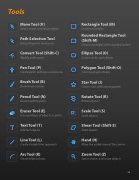
                                                                                                                                                                                        Tools
Move Tool (V)
Select, move, and resize objects
Path Selection Tool
Edit path points and curves
Convert Tool (Shift-C)
Modify path curves
Pen Tool (P)
Create paths with lines and curves
Brush Tool (B)
Draw brush strokes
Pencil Tool (N)
Draw freeform paths
Eraser Tool (E)
Erase portions of objects or paths
Text Tool (T)
Add text objects
Line Tool (L)
Create straight line segments
Arc Tool (K)
Create elliptical arcs
Rectangle Tool (M)
Create rectangles
Rounded Rectangle Tool (Shift-M)
Create rectangles with rounded corners
Ellipse Tool (O)
Create circles and ellipses
Polygon Tool (Shift-O)
Create polygon shapes
Star Tool (J)
Create stars with varying points
Rotate Tool (R)
Rotate objects
Scale Tool (S)
Scale objects
Shear Tool (Shift-S)
Slant objects
Hand (H)
Move the visible area of the canvas
Zoom Tool (Z)
Select, move, and resize objects
                                                      34


