


Page 36 - Graphic Mac User Guide
P. 36
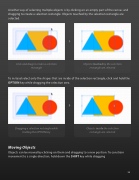
 Another way of selecting multiple objects is by clicking on an empty part of the canvas and dragging to create a selection rectangle. Objects touched by the selection rectangle are selected.
      Click and drag to create a selection Objects touched by the selection rectangle rectangle are selected
To instead select only the shapes that are inside of the selection rectangle, click and hold the OPTION key while dragging the selection area.
       Dragging a selection rectangle while Objects inside the selection holding the OPTION key rectangle are selected
Moving Objects
Objects can be moved by clicking on them and dragging to a new position. To constrain movement to a single direction, hold down the SHIFT key while dragging
 36


