


Page 37 - Graphic Mac User Guide
P. 37
 Selection Info
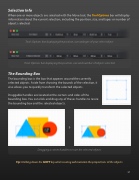
When one or more objects are selected with the Move tool, the Tool Options bar will display information about the current selection, including the position, size, and types or number of objects selected.
Tools Options bar displaying the position, size and type of your select object
Tools Options bar displaying the position, size and number of objects selected
The Bounding Box
The bounding box is the box that appears around the currently selected objects. Aside from showing the bounds of the selection, it also allows you to quickly transform the selected objects.
Draggable handles are located at the corners and sides of the bounding box. You can click and drag any of theses handles to resize the bounding box and the selected objects.
Dragging a corner handle to resize the selected objects
Tip: Holding down the SHIFT key while resizing will maintain the proportions of the objects.
 37


