


Page 39 - Graphic Mac User Guide
P. 39
       Path Selection Tool
The Path Selection tool can be used to select and modify the points and curves of a path.
It allows you to modify shapes by moving and deleting path points, and adjusting the curved sections of a path.
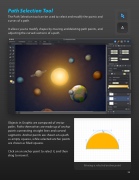
       Objects in Graphic are composed of vector paths. Paths themselves are made up of anchor points connecting straight lines and curved segments. Anchor points are shown on a path as empty squares, while selected anchor points are shown as  lled squares.
Click on an anchor point to select it, and then drag to move it.
Moving a selected anchor point
 39


