


Page 41 - Graphic Mac User Guide
P. 41
 Modifying Curves
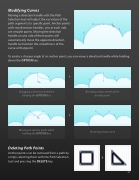
Moving a direction handle with the Path Selection tool will adjust the curvature of the path segment at a speci c point. Anchor points with two direction handles, one at each side, are smooth points. Moving the direction handle on one side of these points will automatically move the opposite direction handle to maintain the smoothness of the curve at that point.
To create a sharper angle at an anchor point, you can move a direction handle while holding down the OPTION key:
        Dragging a direction handle & holding the OPTION key
Moving an anchor point while holding the OPTION key
Deleting Path Points
Anchor points can be removed from a path by simply selecting them with the Path Selection tool and pressing the DELETE key.
Resulting sharp corner at the anchor point
       Resulting sharp curve
      41


