


Page 40 - Graphic Mac User Guide
P. 40
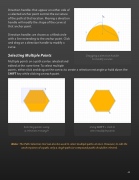
  Direction handles that appear on either side of a selected anchor point control the curvature of the path at that location. Moving a direction handle will modify the shape of the curve at that anchor point.
Direction handles are shown as a  lled circle with a line extending to the anchor point. Click and drag on a direction handle to modify a curve.
Selecting Multiple Points
Dragging a direction handle to modify a curve
Multiple points on a path can be selected and
edited at the same time. To select multiple
points, either click and drag on the canvas to create a selection rectangle or hold down the SHIFT key while clicking on each point.
Selecting points using Using SHIFT + click to a selection rectangle select multiple points
Note: The Path Selection tool can also be used to select multiple paths at once. However, to edit the anchor points of a path, only a single path (or compound path) should be selected.
     40


