


Page 31 - Graphic Mac User Guide
P. 31
 Saving a Shape
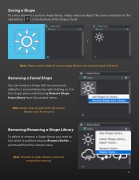
To save a shape to a custom shape library, simply select an object the canvas and click on the add button ( ) at the bottom of the Shapes Panel.
Note: Shapes can be added to custom shape libraries, but not to the built-in libraries.
Removing a Saved Shape
You can remove a shape that was previously added to a custom library by right-clicking on it in the shapes pane and choosing Remove Shape from Library from the context menu.
Note: Shapes that are part of the the built-in libraries can’t be removed.
Removing/Renaming a Shape Library
To delete or rename a shape library you need to  rst select it and then choose Rename/Delete... command from the context menu.
Note: The built-in shape libraries cannot be renamed or removed.
         31


