


Page 46 - Graphic Mac User Guide
P. 46
 Creating a Line Segment after a Curve
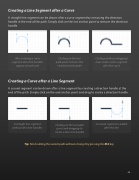
A straight line segment can be drawn after a curve segment by removing the direction handle at the end of the path. Simply click on the last anchor point to remove the direction handle.
      After creating a curve segment, direction handles appear at each side
Clicking on the last path point removes the end direction handle
Clicking (without dragging) now creates a line segment after the curve
Creating a Curve after a Line Segment
A curved segment can be drawn after a line segment by creating a direction handle at the end of the path. Simply click on the end anchor point and drag to create a direction handle.
A straight line segment Clicking on the last path A curved segment is added without direction handles point and dragging to after the line
create a direction handle
Tip: Finish editing the current path without closing it by pressing the ESC key.
       46


