


Page 49 - Graphic Mac User Guide
P. 49
       Brush Tool
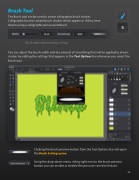
The Brush tool can be used to create calligraphic brush strokes. Calligraphic brushes create brush strokes which appear as if they were drawn using a calligraphic pen or paintbrush.
Brush width and smoothing settings
You can adjust the brush width and the amount of smoothing that will be applied to drawn strokes by editing the settings that appears in the Tool Options bar whenever you select the Brush tool.
       Clicking the brush preview button from the Tool Options bar will open the Brush Settings pane.
Using the drop-down menu sitting right next to the brush preview button you can enable or disable the pressure sensitive feature.
   49


