


Page 50 - Graphic Mac User Guide
P. 50
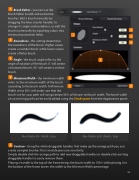
   Brush Editor - you can use the
Brush Editor to edit and customize brushes. Edit a brush manually by dragging the blue circular handles to change its angle and roundness, or edit the brush numerically by inputting values into the brush parameter  elds.
Roundness - this setting determines the roundness of the brush. Higher values create a rounder brush, while lower values create a  atter brush.
Angle - the brush angle refers to the angle of rotation of the brush. 0˚ will create a horizontal brush, 90˚ will create a vertical brush.
Minimum Width - the minimum width
refers to the minimum width of the brush
according to the brush width. A Minimum
Width set to 50% will make sure that the
brush size for your path will not go below 50% of the pre-set brush width. The brush width on an existing path can be easily edited using the Stroke pane from the Appearance panel.
Min. Width: 0% Width : 10 pt Min. Width: 50% Width : 10 pt
Contour - Using the white draggable handles that make up the orange path you can create complex brushes that simulate pressure sensitivity.
Simply double click the orange path to add new draggable handles or double click existing draggable handles to easily remove them.
Placing a handle to the top of the frame brings the brush width to 100% while placing it in the bottom of the frame lowers the width to the Minimum Width percentage.
                 50


