


Page 61 - Graphic Mac User Guide
P. 61
 For perfect arcs, click and drag to create the arc segment while holding the SHIFT key from your keyboard.
 The Arc mode control in the Tool Options bar can be used to change the Arc tool from the default arc mode, to the ‘Circular Arc’ mode. Using the drop-down menu that lies next to those buttons you can set you new arcs to be opened or closed.
Arc Mode
Circular Arc
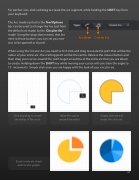
    When using the Circular Arc you need to  rst click and drag to create the path that will be the radius of your circle arc -the starting point will be the centre. Release the mouse button and then drag your cursor around this path to get an outline of the circle arc that you are about to create. Holding down the SHIFT key while moving your cursor will constrain the angle to 15˚ increments. Simply click once you are happy with the look of your circular arc.
Click and drag to create Move the cursor Simply click once to the radius of the circle around the radius create the circle arc
          Easily create pie charts and circular graphs.
 61


