


Page 59 - Graphic Mac User Guide
P. 59
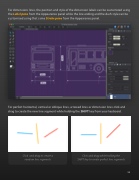
 For dimensions lines, the position and style of the dimension labels can be customized using the Label pane from the Appearance panel while the line ending and the dash style can be customised using that same Stroke pane from the Appearance panel.
For perfect horizontal, vertical or oblique lines, arrowed lines or dimension lines click and drag to create the new line segment while holding the SHIFT key from your keyboard.
Click and drag to create a Click and drag while holding the random line segments SHIFT key to create perfect line segments
    59


