


Page 60 - Graphic Mac User Guide
P. 60
       Arc Tool
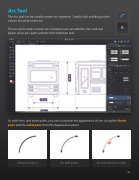
The Arc tool can be used to create arc segments. Simply click and drag on the canvas to create a new arc.
The arc tool creates circular arcs, however you can edit the start and end points of an arc’s path with the Path Selection tool.
      As with lines, and other paths, you can customize the appearance of arcs using the Stroke pane and the Label pane from the Appearance panel.
     Default arc object Arc with arrows Arc with dimension styles
 60


