


Page 58 - Graphic Mac User Guide
P. 58
       Line Tool
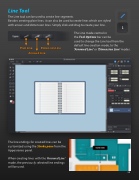
The Line tool can be used to create line segments.
Besides creating plain lines, it can also be used to create lines which are styled with arrows and dimension lines. Simply click and drag to create your line.
The Line mode control in
the Tool Options bar can be
used to change the Line tool from the default line creation mode, to the ‘Arrowed Line’ or ‘Dimension Line’ modes.
         Plain Line
Arrowed Line
Dimension Line
     The line endings for created lines can be customized using the Stroke pane from the Appearance panel.
When creating lines with the ‘Arrowed Line’ mode, the previously selected line endings will be used.
 58


