


Page 56 - Graphic Mac User Guide
P. 56
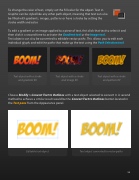
 To change the color of text, simply set the Fill color for the object. Text in Graphic can be styled like any other path object, meaning that text can also be  lled with gradients, images, patterns or have a stroke by setting the stroke width and color.
To edit a gradient or an image applied to a piece of text,  rst click that text to select it and then click it a second time to activate the Gradient tool or the Image tool.
Text objects can also be converted to editable vector paths. This allows you to edit each individual glyph, and edit the paths that make up the text using the Path Selection tool.
       Text object with a stroke Text object with a stroke Text object with a stroke and gradient  ll and image  ll and pattern  ll
Choose Modify > Convert Text to Outlines with a text object selected to convert it. A second method to achieve a similar result would be the Convert Text to Outlines button located in the Text pane from the Appearance panel.
    Editable text object Text object converted to vector paths
 56


