


Page 55 - Graphic Mac User Guide
P. 55
       Text Tool
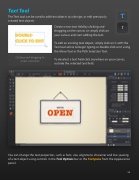
The Text tool can be used to add text objects to a design, or edit previously created text objects.
      Clicking and dragging to create a text box
Create a new text  eld by clicking and dragging on the canvas or simply click on your canvas and start adding the text.
To edit an existing text object, simply click on it with the Text tool active to begin typing or double click on it using the Move Tool or the Path Selection Tool.
To deselect a text  eld click anywhere on your canvas, outside the selected text  eld.
 You can change the text properties, such as font, size, alignment, character and line spacing of a text object using controls in the Tool Options bar or the Text pane from the Appearance panel.
 55


