


Page 53 - Graphic Mac User Guide
P. 53
       Pencil Tool
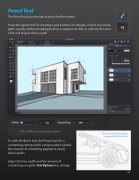
The Pencil tool can be used to draw freeform paths.
It can be a great tool for creating a quick sketch of a design, since it can create paths quickly without needing to draw a segment at time as with the Pen tool. Click and drag to draw a path.
        Path width and smoothing settings
As with the Brush tool, the Pencil tool has a smoothing setting which can be used to control the amount of smoothing applied to newly drawn paths.
Adjust the line width and the amount of smoothing using the Tool Options bar settings.
 Sketch created by tracing an image with the Pencil tool
 53


