


Page 54 - Graphic Mac User Guide
P. 54
           Eraser Tool
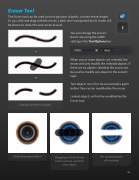
The Eraser tool can be used to erase portions of paths, or even entire shapes. As you click and drag with the eraser, a dark semi-transparent brush stroke will be drawn to show the areas to be erased.
         You can change the eraser’s brush size using the width setting in the Tool Options bar.
When one or more objects are selected, the eraser will only modify the selected objects. If there are no objects selected, the eraser can be used to modify any object in the current layer.
Text objects must  rst be converted to paths before they can be modi ed by the eraser.
Locked objects will not be modi ed by the Eraser tool.
           Erasing a portion of a path.
      Original grouped object
Dragging with the Eraser tool to remove a portion of an object
The modi ed paths after erasing
 54


