


Page 77 - Graphic Mac User Guide
P. 77
      Pattern Tool
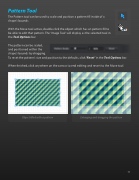
The Pattern tool can be used to scale and position a pattern  ll inside of a shape’s bounds.
With the Move tool active, double click the object which has an pattern  ll to be able to edit that pattern. The ‘Image Tool’ will display as the selected tool in the Tool Options bar.
The pattern can be scaled,
and positioned within the
shape’s bounds by dragging.
To reset the pattern’s size and position to the defaults, click ‘Reset’ in the Tool Options bar.
When  nished, click anywhere on the canvas to end editing and revert to the Move tool.
    x2
     Object  lled with a pattern Enlarging and dragging the pattern
 77


