


Page 79 - Graphic Mac User Guide
P. 79
  Stroke pane
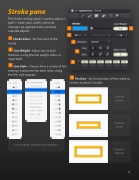
The Stroke settings pane is used to adjust a path’s stroke color, width, and style. Changes are applied to the currently selected objects.
Stroke Color - Set the color of the stroke.
Line Weight - Adjust the stroke’s thickness using the line weight slider, or input  eld.
Line Style - Choose from a variety of line endings and preset line dash styles using the line style popups.
Line endings and dash style popups
Position - Set the position of the stroke to Centre, Inside or Outside.
Position Center
Position Inside
Position Outside
                   79


