


Page 78 - Graphic Mac User Guide
P. 78
 Appearance Panel
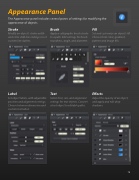
The Appearance panel includes several panes of settings for modifying the appearance of objects.
  Stroke
Modify an object’s stroke width and color. Add line endings or set custom line dashes.
Label
Set object labels, with adjustable position and alignment settings. Choose between dimension and custom text labels.
Brush
Apply a calligraphic brush stroke to a path. Edit settings for brush roundness, angle, and diameter.
Fill
Set and customize an object’s  ll. Choose from color, gradient, pattern and image  lls.
Effects
Adjust the opacity of an object, and apply and edit drop shadows.
   Text
Select font, size, and alignment settings for text objects. Convert a text object to editable paths.
    78


