


Page 81 - Graphic Mac User Guide
P. 81
  Brush pane
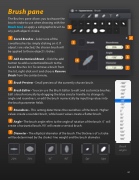
The Brushes pane allows you to choose the brush stroke to use when drawing with the Brush tool, or apply a calligraphic brush to any path object’s stroke.
Saved Brushes - Select one of the saved brushes by simply clicking on it. If objects are selected, the chosen brush will be applied to those object’s strokes.
Add Customized Brush - Click the add button to add a customized brush to the Saved Brushes list. To remove a brush from the list, right-click on it and choose Remove Brush from the context menu.
Brush Preview - Small preview of the currently chosen brush.
Brush Editor - You can use the Brush Editor to edit and customize brushes. Edit a brush manually by dragging the blue circular handles to change its angle and roundness, or edit the brush numerically by inputting values into the brush parameter  elds.
Roundness - This setting determines the roundness of the brush. Higher values create a rounder brush, while lower values create a  atter brush.
Angle - The brush angle refers to the angle of rotation of the brush. 0˚ will create a horizontal brush, 90˚ will create a vertical brush.
Diameter - The elliptical diameter of the brush. The thickness of a stroke will be determined by the stroke’s line weight and the brush diameter.
20% 70% 45˚ 90˚ 5pt 10pt
Brush angles
                         81


