


Page 82 - Graphic Mac User Guide
P. 82
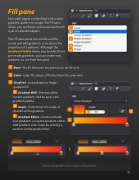
  Fill pane
Each path object can be  lled with a color, gradient, pattern or image. The Fill pane allows you to choose and customize the  ll style of selected objects.
The Fill pane pane can also be used to create and edit gradients or to adjust the properties of a patterns. Although the Gradient Palette allows you to select from pre-made gradients, you can create new gradients to use from this pane.
None - No  ll. Removes any previously set  ll style.
Color - Color  ll. Select a  ll color from the color well.
Gradient - Linear,Radial or Angle gradient  ll.
Gradient Well - Preview of the current gradient; click to access the gradient palette.
Angle - Determines the angle of rotation of the gradient.
Gradient Editor - Create and edit new gradients using the gradient editor. Add gradient color stops by clicking a location on the gradient bar.
                      Click on the gradient bar to add a color pointer
 82


