


Page 39 - Computer Graphics Handout
P. 39
Chapter 2


                                     GRAPHICS PROGRAMMING


          Our approach to computer graphics is programming oriented. Consequently, we want you to get started programming graphics
          as soon as possible. To this end, we will introduce a minimal application programming interface (API). This API will be sufficient to
          allow you to program many interesting two- and three-dimensional problems and to familiarize you with the basic graphics concepts.
          We regard two-dimensional graphics as a special case of three-dimensional graphics. This perspective allows us to get started, even
          though  we  will  touch  on  three-dimensional  concepts  lightly  in  this  chapter.  Our  two-dimensional  code  will  execute  without
          modification on a three-dimensional system. Our development will use a simple but informative problem: the Sierpinski gasket. It
          shows how we can generate an interesting and, to many people, unexpectedly sophisticated image using only a handful of graphics
          functions. We use OpenGL as our API, but our discussion of the underlying concepts is broad enough to encompass most modern
          systems. The functionality that we introduce in this chapter is sufficient to allow you to write basic two- and three-dimensional
          programs that do not require user interaction.


          2.1 THE SIERPINSKI GASKET


          We will use as a sample problem the drawing of the Sierpinski gasket—an interesting shape that has a long history and is of interest
          in areas such as fractal geometry. The Sierpinski gasket is an object that can be defined recursively and randomly; in the limit,
          however, it has properties that are not at all random. We start with a two-dimensional version, but as we will see in Section 2.10,
          the three-dimensional version is almost identical. Suppose that we start with three points in space. As long as the points are not
          collinear, they are the vertices of a unique triangle and also define a unique plane. We assume that this plane is the plane z = 0 and
                                                                  6
          that these points, as specified in some convenient coordinate system , are (x1, y1, 0), (x2, y2, 0), and (x3, y3, 0). The
          construction proceeds as follows:
          1. Pick an initial point p = (x, y, 0) at random inside the triangle.
          2. Select one of the three vertices at random.
          3. Find the point q halfway between p and the randomly selected vertex.
          4. Display q by putting some sort of marker, such as a small circle, at the corresponding
          location on the display.
          5. Replace p with q.
          6. Return to step 2.
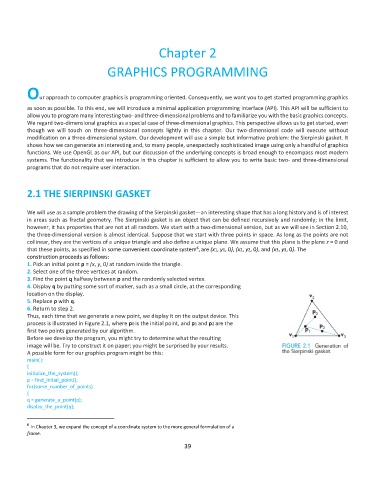
          Thus, each time that we generate a new point, we display it on the output device. This
          process is illustrated in Figure 2.1, where p0 is the initial point, and p1 and p2 are the
          first two points generated by our algorithm.
          Before we develop the program, you might try to determine what the resulting
          image will be. Try to construct it on paper; you might be surprised by your results.
          A possible form for our graphics program might be this:
          main( )
          {
          initialize_the_system();
          p = find_initial_point();
          for(some_number_of_points)
          {
          q = generate_a_point(p);
          display_the_point(q);


          6
            In Chapter 3, we expand the concept of a coordinate system to the more general formulation of a
          frame.
                                                              39

