


Page 41 - Computer Graphics Handout
P. 41
Once we answer these questions, we will be able to place our geometry on the GPU in a form that can be rendered. Then, we will
          be able to address how we view our objects using the power of programmable shaders.


          2.2 PROGRAMMING TWO-DIMENSIONAL APPLICATIONS


          For two-dimensional applications, such as the Sierpinski gasket, although we could use a pen-plotter API, such an approach would
          limit us. Instead, we choose to start with a three-dimensional world; we regard two-dimensional systems, such as the one on which
          we will produce our image, as special cases. Mathematically, we view the two-dimensional plane, or a simple two-dimensional
          curved surface, as a subspace of a three-dimensional space. Hence, statements—both practical and abstract—about the larger
          three-dimensional world hold for the simpler two-dimensional world. We can represent a point in the plane z = 0 as p = (x, y, 0) in
          the threedimensional world, or as p = (x, y) in the two-dimensional plane. OpenGL, like most three-dimensional graphics systems,
          allows us to use either representation, with the underlying internal representation being the same, regardless of which form the
          user chooses. We can implement representations of points in a number of ways, but the simplest is to think of a three-dimensional
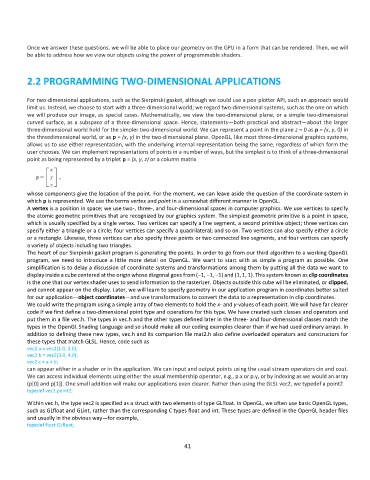
          point as being represented by a triplet p = (x, y, z) or a column matrix


          whose components give the location of the point. For the moment, we can leave aside the question of the coordinate system in
          which p is represented. We use the terms vertex and point in a somewhat different manner in OpenGL.
          A vertex is a position in space; we use two-, three-, and four-dimensional spaces in computer graphics. We use vertices to specify
          the atomic geometric primitives that are recognized by our graphics system. The simplest geometric primitive is a point in space,
          which is usually specified by a single vertex. Two vertices can specify a line segment, a second primitive object; three vertices can
          specify either a triangle or a circle; four vertices can specify a quadrilateral; and so on. Two vertices can also specify either a circle
          or a rectangle. Likewise, three vertices can also specify three points or two connected line segments, and four vertices can specify
          a variety of objects including two triangles.
          The heart of our Sierpinski gasket program is generating the points. In order to go from our third algorithm to a working OpenGL
          program,  we  need  to  introduce  a  little  more  detail  on  OpenGL.  We  want  to start  with  as  simple  a  program  as  possible.  One
          simplification is to delay a discussion of coordinate systems and transformations among them by putting all the data we want to
          display inside a cube centered at the origin whose diagonal goes from (−1, −1, −1) and (1, 1, 1). This system known as clip coordinates
          is the one that our vertex shader uses to send information to the rasterizer. Objects outside this cube will be eliminated, or clipped,
          and cannot appear on the display. Later, we will learn to specify geometry in our application program in coordinates better suited
          for our application—object coordinates—and use transformations to convert the data to a representation in clip coordinates.
          We could write the program using a simple array of two elements to hold the x- and y-values of each point. We will have far clearer
          code if we first define a two-dimensional point type and operations for this type. We have created such classes and operators and
          put them in a file vec.h. The types in vec.h and the other types defined later in the three- and four-dimensional classes match the
          types in the OpenGL Shading Language and so should make all our coding examples clearer than if we had used ordinary arrays. In
          addition to defining these new types, vec.h and its companion file mat2.h also define overloaded operators and constructors for
          these types that match GLSL. Hence, code such as
          vec2 a = vec2(1.0, 2.0);
          vec2 b = vec2(3.0, 4.0);
          vec2 c = a + b;
          can appear either in a shader or in the application. We can input and output points using the usual stream operators cin and cout.
          We can access individual elements using either the usual membership operator, e.g., p.x or p.y, or by indexing as we would an array
          (p[0] and p[1]). One small addition will make our applications even clearer. Rather than using the GLSL vec2, we typedef a point2
          typedef vec2 point2;

          Within vec.h, the type vec2 is specified as a struct with two elements of type GLfloat. In OpenGL, we often use basic OpenGL types,
          such as GLfloat and GLint, rather than the corresponding C types float and int. These types are defined in the OpenGL header files
          and usually in the obvious way—for example,
          typedef float GLfloat;


                                                              41

