


Page 75 - Computer Graphics Handout
P. 75
points array, which is sizeof(points). We use that size as the starting offset in the second glBufferSubData call. If in the shader the
          color is named vColor, the second vertex array can be set up in the shader initialization:
          loc2 = glGetAttribLocation(program, "vColor");
          glEnableVertexAttribArray(loc2);
          glVertexAttribPointer(loc2, 3, GL_FLOAT, GL_FALSE, 0,
          BUFFER_OFFSET(sizeof(points)));
          In the vertex shader, we use vColor to set a color to be sent to the fragment shader.

          2.10.3 Hidden-Surface Removal
          If you execute the code in the previous section, you might be confused by the results. The program draws triangles in the order that
          they are specified in the program. This order is determined by the recursion in our program and not by the geometric relationships
          among the triangles. Each triangle is drawn (filled) in a solid color and is drawn over those triangles that have already been rendered
          to the display.
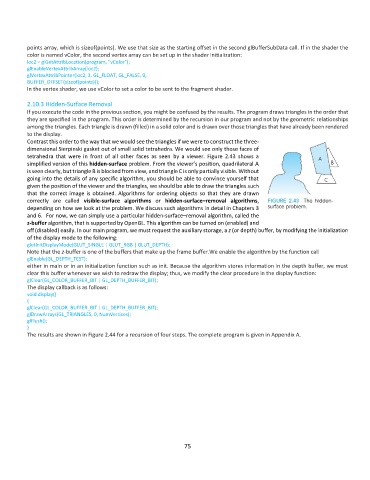
          Contrast this order to the way that we would see the triangles if we were to construct the three-
          dimensional Sierpinski gasket out of small solid tetrahedra. We would see only those faces of
          tetrahedra  that  were  in  front  of  all  other  faces  as  seen  by  a  viewer.  Figure  2.43  shows  a
          simplified version of this hidden-surface problem. From the viewer’s position, quadrilateral A
          is seen clearly, but triangle B is blocked from view, and triangle C is only partially visible. Without
          going into the details of any specific algorithm, you should be able to convince yourself that
          given the position of the viewer and the triangles, we should be able to draw the triangles such
          that the correct image is obtained. Algorithms for ordering objects so that they are drawn
          correctly  are  called  visible-surface  algorithms  or  hidden-surface–removal  algorithms,
          depending on how we look at the problem. We discuss such algorithms in detail in Chapters 3
          and 6.  For now, we can simply use a particular hidden-surface–removal algorithm, called the
          z-buffer algorithm, that is supported by OpenGL. This algorithm can be turned on (enabled) and
          off (disabled) easily. In our main program, we must request the auxiliary storage, a z (or depth) buffer, by modifying the initialization
          of the display mode to the following:
          glutInitDisplayMode(GLUT_SINGLE | GLUT_RGB | GLUT_DEPTH);
          Note that the z-buffer is one of the buffers that make up the frame buffer.We enable the algorithm by the function call
          glEnable(GL_DEPTH_TEST);
          either in main or in an initialization function such as init. Because the algorithm stores information in the depth buffer, we must
          clear this buffer whenever we wish to redraw the display; thus, we modify the clear procedure in the display function:
          glClear(GL_COLOR_BUFFER_BIT | GL_DEPTH_BUFFER_BIT);
          The display callback is as follows:
          void display()
          {
          glClear(GL_COLOR_BUFFER_BIT | GL_DEPTH_BUFFER_BIT);
          glDrawArrays(GL_TRIANGLES, 0, NumVertices);
          glFlush();
          }
          The results are shown in Figure 2.44 for a recursion of four steps. The complete program is given in Appendix A.


                                                              75

