


Page 27 - Advantech WP-5530
P. 27
Rear Mount VFD Installation


            1.  Turn off the system power properly through the operating system, then turn off any external
               devices.

            2.  Disconnect the power cord from the power outlet and disconnect any external devices.


                  CAUTION:       Regardless of the power-on state, voltage is always present on the main board as
                                 long as the system is plugged into an active AC outlet. You must disconnect the
                                 power cord to avoid damage to the internal components of the system.


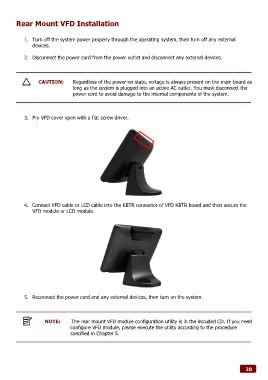
            3.  Pry VFD cover open with a flat screw driver.


            4.  Connect VFD cable or LCD cable into the KBTR connector of VFD KBTR board and then secure the
               VFD module or LCD module.


            5.  Reconnect the power cord and any external devices, then turn on the system.


                     NOTE:       The rear mount VFD module configuration utility is in the included CD. If you need
                                configure VFD module, please execute the utility according to the procedure
                                specified in Chapter 5.


                                                                                                              20

