


Page 47 - JoFA_2022
P. 47
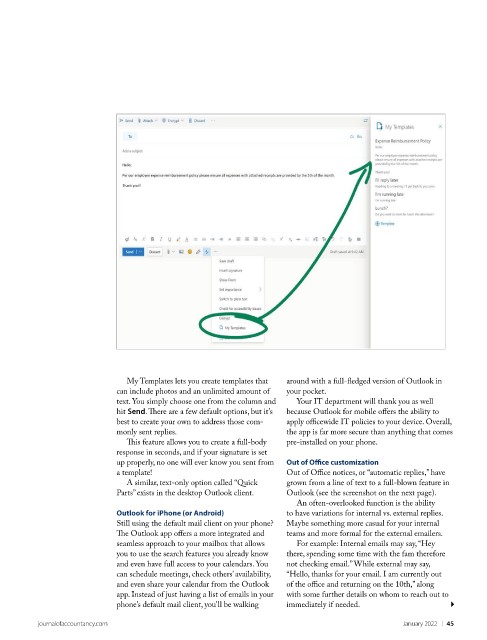
My Templates lets you create templates that   around with a full-fledged version of Outlook in
                             can include photos and an unlimited amount of   your pocket.
                             text. You simply choose one from the column and   Your IT department will thank you as well
                             hit Send. There are a few default options, but it’s   because Outlook for mobile offers the ability to
                             best to create your own to address those com-  apply officewide IT policies to your device. Overall,
                             monly sent replies.                     the app is far more secure than anything that comes
                               This feature allows you to create a full-body   pre-installed on your phone.
                             response in seconds, and if your signature is set
                             up properly, no one will ever know you sent from   Out of Office customization
                             a template!                             Out of Office notices, or “automatic replies,” have
                               A similar, text-only option called “Quick   grown from a line of text to a full-blown feature in
                             Parts” exists in the desktop Outlook client.   Outlook (see the screenshot on the next page).
                                                                       An often-overlooked function is the ability
                             Outlook for iPhone (or Android)         to have variations for internal vs. external replies.
                             Still using the default mail client on your phone?   Maybe something more casual for your internal
                             The Outlook app offers a more integrated and   teams and more formal for the external emailers.
                             seamless approach to your mailbox that allows   For example: Internal emails may say, “Hey
                             you to use the search features you already know   there, spending some time with the fam therefore
                             and even have full access to your calendars. You   not checking email.” While external may say,
                             can schedule meetings, check others’ availability,   “Hello, thanks for your email. I am currently out
                             and even share your calendar from the Outlook   of the office and returning on the 10th,” along
                             app. Instead of just having a list of emails in your   with some further details on whom to reach out to
                             phone’s default mail client, you’ll be walking   immediately if needed.

          journalofaccountancy.com                                                              January 2022    |   45

