


Page 12 - Graphic Mac User Guide
P. 12
 Interface Overview
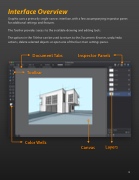
Graphic uses a primarily single-canvas interface, with a few accompanying inspector panes for additional settings and features.
The Toolbar provides access to the available drawing and editing tools.
The options in the Titlebar can be used to return to the Documents Browser, undo/redo actions, delete selected objects or open one of the four main settings panes.
Document Tabs Toolbar
Inspector Panels
           Color Wells
Layers
  Canvas
 12


