


Page 14 - Graphic Mac User Guide
P. 14
 Toolbar
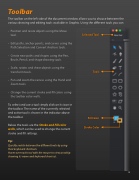
The toolbar on the left side of the document window allows you to choose between the various drawing and editing tools available in Graphic. Using the different tools you can:
• Position and resize objects using the Move tool.
• Edit paths, anchor points, and curves using the Path Selection and Convert Anchors tools.
• Create new paths and shapes using the Pen, Brush, Pencil, and shape drawing tools.
• Scale, rotate, and shear objects using the transform tools.
• Pan and zoom the canvas using the Hand and Zoom tools.
• Change the current stroke and  ll colors using the toolbar color wells.
To select and use a tool simply click on its icon in the toolbar. The name of the currently selected and active tool is shown in the indicator above the toolbar.
Below the tools are the Stroke and Fill color wells, which can be used to change the current stroke and  ll settings.
Tip:
Quickly switch between the different tools by using their keyboard shortcuts.
Hover over each tool with the mouse to view a tooltip showing its name and keyboard shortcut.
   Selected Tool
  Tools
  Fill Color Stroke Color
    14


