


Page 15 - Graphic Mac User Guide
P. 15
 Tool Options
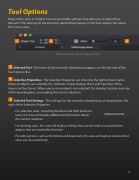
Many of the tools in Graphic have customizable settings that allow you to adjust their behavior. The settings for the currently selected tool appear in the Tool Options Bar above the Canvas area.
The tool options for the Polygon Tool
Selected Tool - The name of the currently selected tool appears on the left side of the Tool Options Bar.
Selection Properties - The Selection Properties are shown to the right of tool’s name. When no objects are selected, this indicator simply displays the X and Y position of the mouse on the Canvas. When one or more objects are selected, this displays location and size of the bounding box surrounding the current selection
Selected Tool Settings - The settings for the currently selected tool are displayed to the right of the Selection Properties.
- For selection tools, including the Move and Path Selection tools, this area will display additional information about the current selection.
- For drawing tools, this area will display settings that can be used to customize the objects that are created by that tool.
- For editing tools, such as the Rotate and Scale tools, this area will contain controls that allow you to numerically
         15


