


Page 17 - Graphic Mac User Guide
P. 17
 Colors, Gradients and Patterns
Each object in raphicGraphic is composed of one or more vector paths. Object paths are drawn by drawing the line around the path (Stroke) and drawing the area inside of the path (Fill).
Strokes are drawn based on their width and color. Fills can be either a color, a gradient, or an image.
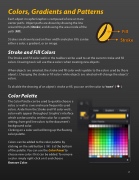
Stroke and Fill Colors
Fill Stroke
     The Stroke and Fill color wells in the toolbar can be used to set the current stroke and  ll colors. Drawing tools will use these colors when creating new objects.
When objects are selected, the stroke and  ll color wells update to the colors used by those objects. Changing the stroke or  ll colors while objects are selected will change the objects’ colors.
To disable the drawing of an object’s stroke or  ll, you can set the color to ‘none’ (   ). Color Palette
The Color Palette can be used to quickly choose a color, as well as save and reuse frequently used colors. Aside from the Stroke and Fill color wells, color wells appear throughout Graphic’s interface which can be used to set the color for a speci c setting, from grid line colors to the document’s background color.
Clicking on a color well will bring up the  oating color palette.
Colors can be added to the color palette by clicking on the add button (   ) at the bottom of the palette. You can use the Color Panel to choose new colors that can be added. To remove a color simply right-click on it and choose Remove Color.
    17


