


Page 18 - Graphic Mac User Guide
P. 18
  Color Panel
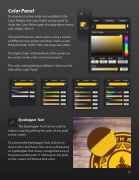
To choose a custom color not available in the Color Palette, the Color Picker can be used. To show the Color Picker open the drop-down menu and simply select it.
The Color Panel can select colors using a variety of different color picker interfaces, from a Color Wheel to RGB, CMYK, HSB, and Grayscale sliders.
The Alpha slider at the bottom of the panel can be used to make colors semi-transparent.
The color setting being modi ed is shown as the title of the Color Panel.
Eyedropper Tool
The Eyedropper Tool can be used to select a color by picking the color of any pixel on the screen.
To activate the Eyedropper Tool, click on its icon in the Color Panel. The cursor will become an Eyedropper that shows a magni ed area of the pixels underneath it. Clicking on any pixel on the screen will choose that color.
       18


