


Page 20 - Graphic Mac User Guide
P. 20
 Recoloring Artwork
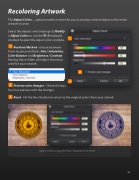
The Adjust Colors... options makes it easier for you to recolour several object or the entire artwork at once.
Select the objects and simply go to Modify > Adjust Colors or use the ⌘-3 keyboard
shortcut to open the Adjust Colors window.
Recolour Method - choose between three recolour methods: Hue / Saturation, Color Balance and Brightness / Contrast. Moving those sliders will adjust the colors used for your artwork.
Preview color changes - Check this box for a live preview with the changes.
Reset - Hit the Reset button to return to the original colors from your atwork.
Adjust colors using the Hue / Saturation method
             20


