


Page 19 - Graphic Mac User Guide
P. 19
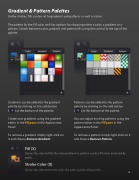
 Gradient & Pattern Palettes
Unlike strokes,  lls can be set to gradients and patterns as well as colors.
The palette for the Fill color well has options for choosing either a color, a gradient or a pattern. Switch between color, gradient and pattern  lls using the control at the top of the palette.
  Gradients can be added to the gradient palette by clicking on the add button
( ) at the bottom of the palette.
Create new gradients using the gradient editor in the Fill pane in the Appearance Panel.
To remove a gradient simply right-click on it and choose Remove Gradient.
Fill (X)
Shows the selected  ll, the color,gradient or pattern used to  ll areas enclosed by paths.
Stroke Color (X)
Shows the selected stroke color, the color used to draw paths.
Patterns can be added to the pattern palette by clicking on the add button ( ) at the bottom of the palette.
You can adjust existing patterns using the pattern editor in the Fill pane in the Appearance Panel.
To remove a pattern simply right-click on it and choose Remove Pattern.
      19


