


Page 23 - Graphic Mac User Guide
P. 23
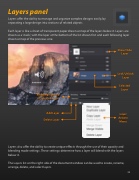
 Layers panel
Layers offer the ability to manage and organize complex designs easily, by separating a large design into sections of related objects.
Each layer is like a sheet of transparent paper drawn on top of the layers below it. Layers are drawn as a ‘stack’, with the layer at the bottom of the list drawn  rst and each following layer drawn on top of the previous one.
          Blending/Opacity of Selected Layer
Add Layer Delete Layer
Show/Hide Layer
Lock/Unlock Layer
Selected Layer
Layer Actions Menu
        Layers also offer the ability to create unique effects through the use of their opacity and blending mode settings. These settings determine how a layer will blend with the layers below it.
The Layers list on the right side of the document window can be used to create, rename, arrange, delete, and select layers.
 23


