


Page 88 - Graphic Mac User Guide
P. 88
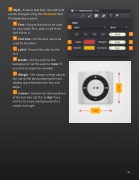
   Style - A label’s text font, size and style can be changed using the Text pane from the Appearance panel.
Font - Choose the font to be used for your label. Also., pick a style if the font allows it.
Font Size - Set the font size to be used for the label.
Label - Choose the color for the text.
Border - Set the color for the background. Set the color to ‘none’ if you wish to make this invisible.
Margin - The margin setting adjusts the size of the box bordering the text, adding space between the text and edges.
Corners - Determines the roundness of the text box. Set this to 0 pt if you wish to turn your background into a simple rectangle.
              88


