


Page 87 - Graphic Mac User Guide
P. 87
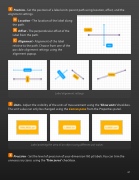
  Position - Set the position of a label on its parent path using location, offset, and the alignment settings.
Location - The location of the label along the path.
Offset - The perpendicular offset of the label from the path.
Alignment - Alignment of the label relative to the path. Choose from one of the possible alignment settings using the alignment popup.
Label alignment settings
Units - Adjust the visibility of the units of measurement using the ‘Show units’ checkbox. The unit value can only be changed using the Canvas pane from the Properties panel.
Label pointing the area of an object using different unit values
Precision - Set the level of precision of your dimension180 pt labels.You can trim the unnecessary zeros using the ‘Trim zeros’ checkbox.
               87


