


Page 89 - Graphic Mac User Guide
P. 89
  Text pane
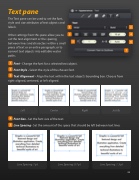
The Text pane can be used to set the font, style and size attributes of text objects and labels.
Other settings from this pane allow you to set the text alignment or the spacing between lines and characters within a small piece of text or an entire paragraph; or to convert text objects into editable vector paths.
Font - Change the font for a selected text object.
Font Style - Select the style of the chosen font.
Text Alignment - Align the text within the text object’s bounding box. Choose from right-aligned, centered, or left-aligned.
Left Center Right Justify
Font Size - Set the font size of the text.
Line Spacing - Set the amount of the space that should be left between text lines
Line Spacing: 1 pt Line Spacing: 0.7 pt Line Spacing: 1.3 pt
                          89


