


Page 86 - Graphic Mac User Guide
P. 86
  Label pane
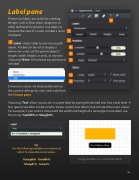
Dimension labels are useful for creating designs such as  oor plans, diagrams, or other technical illustrations. Use labels to measure the area of a room or label a series of objects.
Label - Add a label to any line or path object. A label can be set to display a dimension value (of the parent object’s length, width, height, or area), or any text. Choosing ‘None’ will remove any previously set label.
Dimension values are displayed based on the current settings for units and scale from the Canvas pane.
Choosing ’Text’ allows you to set a custom label by typing the desired text into a text  eld. A few special variables can be used to create custom text labels that include dimension values. For example, if you wish to show both the width and height of a rectangle in one label, use the string: %width% x %height%.
            Tip:
Use the following variables in custom text labels to show dimension values:
%length% %width% %height% %area%
Using variables in a custom text label
 86


