


Page 130 - UNI 101 Computer Science Handout.
P. 130
Faculty of Nursing
                                                                  Adult care Nursing Department


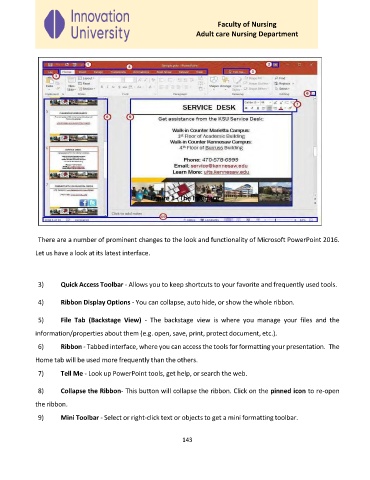
                                                   Figure 1 - The Interface


              There are a number of prominent changes to the look and functionality of Microsoft PowerPoint 2016.

             Let us have a look at its latest interface.


              3)     Quick Access Toolbar - Allows you to keep shortcuts to your favorite and frequently used tools.


              4)     Ribbon Display Options - You can collapse, auto hide, or show the whole ribbon.

              5)     File  Tab  (Backstage  View)  -  The  backstage  view  is  where  you  manage  your  files  and  the

             information/properties about them (e.g. open, save, print, protect document, etc.).

              6)     Ribbon - Tabbed interface, where you can access the tools for formatting your presentation.  The

             Home tab will be used more frequently than the others.
              7)     Tell Me - Look up PowerPoint tools, get help, or search the web.


              8)     Collapse the Ribbon- This button will collapse the ribbon. Click on the pinned icon to re-open

             the ribbon.
              9)     Mini Toolbar - Select or right-click text or objects to get a mini formatting toolbar.


                                                             143

