


Page 132 - UNI 101 Computer Science Handout.
P. 132
Faculty of Nursing
                                                                  Adult care Nursing Department


              The Quick Access Toolbar


              The Quick Access Toolbar is a small toolbar  at the top  left of the application window that you  can
             customize to contain the buttons for the functions that you use most often.


                                                Figure 4 - Quick Access Toolbar

              To customize the Quick Access Toolbar:

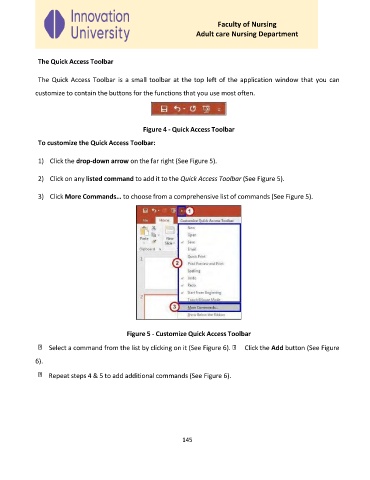
              1)  Click the drop-down arrow on the far right (See Figure 5).


              2)  Click on any listed command to add it to the Quick Access Toolbar (See Figure 5).


              3)  Click More Commands… to choose from a comprehensive list of commands (See Figure 5).


                                           Figure 5 - Customize Quick Access Toolbar

                  Select a command from the list by clicking on it (See Figure 6).   Click the Add button (See Figure

             6).

                  Repeat steps 4 & 5 to add additional commands (See Figure 6).


                                                             145

