


Page 135 - Computer Graphics Handout
P. 135
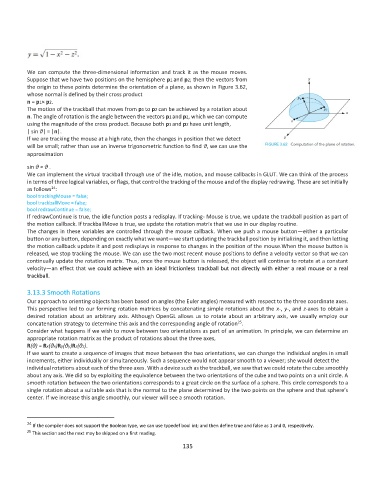
We can compute the three-dimensional information and track it as the mouse moves.
          Suppose that we have two positions on the hemisphere p1 and p2; then the vectors from
          the origin to these points determine the orientation of a plane, as shown in Figure 3.62,
          whose normal is defined by their cross product
          n = p1× p2.
          The motion of the trackball that moves from p1 to p2 can be achieved by a rotation about
          n. The angle of rotation is the angle between the vectors p1 and p2, which we can compute
          using the magnitude of the cross product. Because both p1 and p2 have unit length,
          | sin θ| = |n|.
          If we are tracking the mouse at a high rate, then the changes in position that we detect
          will be small; rather than use an inverse trigonometric function to find θ, we can use the
          approximation

          sin θ ≈ θ .
          We can implement the virtual trackball through use of the idle, motion, and mouse callbacks in GLUT. We can think of the process
          in terms of three logical variables, or flags, that control the tracking of the mouse and of the display redrawing. These are set initially
                  24
          as follows :
          bool trackingMouse = false;
          bool trackballMove = false;
          bool redrawContinue = false;
          If redrawContinue is true, the idle function posts a redisplay. If tracking- Mouse is true, we update the trackball position as part of
          the motion callback. If trackballMove is true, we update the rotation matrix that we use in our display routine.
          The changes in these variables are controlled through the mouse callback. When we push a mouse button—either a particular
          button or any button, depending on exactly what we want—we start updating the trackball position by initializing it, and then letting
          the motion callback update it and post redisplays in response to changes in the position of the mouse.When the mouse button is
          released, we stop tracking the mouse. We can use the two most recent mouse positions to define a velocity vector so that we can
          continually update the rotation matrix. Thus, once the mouse button is released, the object will continue to rotate at a constant
          velocity—an effect that we could achieve with an ideal frictionless trackball but not directly with either a real mouse or a real
          trackball.

          3.13.3 Smooth Rotations
          Our approach to orienting objects has been based on angles (the Euler angles) measured with respect to the three coordinate axes.
          This perspective led to our forming rotation matrices by concatenating simple rotations about the x-, y-, and z-axes to obtain a
          desired rotation about an arbitrary axis. Although OpenGL allows us to rotate about an arbitrary axis, we usually employ our
                                                                                25
          concatenation strategy to determine this axis and the corresponding angle of rotation .
          Consider what happens if we wish to move between two orientations as part of an animation. In principle, we can determine an
          appropriate rotation matrix as the product of rotations about the three axes,
          R(θ) = Rx(θx)Ry(θy)Rz(θz).
          If we want to create a sequence of images that move between the two orientations, we can change the individual angles in small
          increments, either individually or simultaneously. Such a sequence would not appear smooth to a viewer; she would detect the
          individual rotations about each of the three axes. With a device such as the trackball, we saw that we could rotate the cube smoothly
          about any axis. We did so by exploiting the equivalence between the two orientations of the cube and two points on a unit circle. A
          smooth rotation between the two orientations corresponds to a great circle on the surface of a sphere. This circle corresponds to a
          single rotation about a suitable axis that is the normal to the plane determined by the two points on the sphere and that sphere’s
          center. If we increase this angle smoothly, our viewer will see a smooth rotation.


          24  If the compiler does not support the Boolean type, we can use typedef bool int; and then define true and false as 1 and 0, respectively.
          25  This section and the next may be skipped on a first reading.
                                                             135

