


Page 134 - Computer Graphics Handout
P. 134
As just noted, we need the ability to rotate about only two axes to achieve any orientation. We could then use the left mouse button
          and the mouse position to control orientation. We can use the distance from the center of the screen to control the x and y rotations.
          Thus, if the left mouse button is held down but the mouse is located in the center of the screen, there will be no rotation; if the
          mouse is moved up, the object will be rotated about the y-axis in a clockwise manner; and if the mouse is moved down, the object
          will be rotated about the y-axis in a counterclockwise manner. Likewise, motion to the right or left will cause rotation about the x-
          axis.
          The distance from the center can control the speed of rotation. Motion toward the corners can cause simultaneous rotations about
          the x- and y-axes. Using the right mouse button in a similar manner, we can translate the object right to left and up to down. We
          might use the middle mouse button to move the object toward or away from the viewer by having the mouse position control a
          translation in the z-direction. The code for such an interface is straightforward in GLUT; we leave it as an exercise (Exercise 3.20).

          3.13.2 A Virtual Trackball
          The use of the mouse position to control rotation about two axes provides us with most of the functionality of a trackball. We can
          go one step further and create a graphical or virtual trackball using our mouse and the display. One of the benefits of such a device
          is that we can create a frictionless trackball that, once we start it rotating, will continue to rotate until stopped by the user. Thus,
          the device will support continuous rotations of objects but will still allow changes in the speed and orientation of the rotation. We
          can also do the same for translation and other parameters that we can control from the mouse.


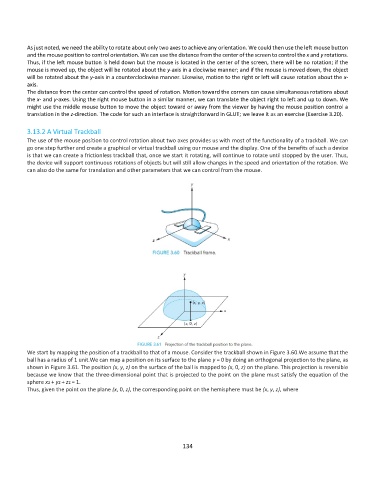
          We start by mapping the position of a trackball to that of a mouse. Consider the trackball shown in Figure 3.60.We assume that the
          ball has a radius of 1 unit.We can map a position on its surface to the plane y = 0 by doing an orthogonal projection to the plane, as
          shown in Figure 3.61. The position (x, y, z) on the surface of the ball is mapped to (x, 0, z) on the plane. This projection is reversible
          because we know that the three-dimensional point that is projected to the point on the plane must satisfy the equation of the
          sphere x2 + y2 + z2 = 1.
          Thus, given the point on the plane (x, 0, z), the corresponding point on the hemisphere must be (x, y, z), where


                                                             134

