


Page 167 - JoFA_2022
P. 167
About the
          author
          Kelly L. Williams,
          CPA, Ph.D., MBA,
          is an associate
          professor of
          accounting at the
          Jones College of
          Business at Middle
          Tennessee State
          University.


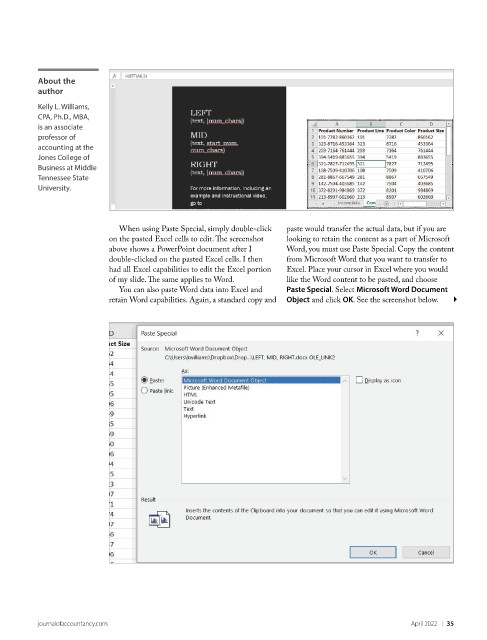
                             When using Paste Special, simply double-click   paste would transfer the actual data, but if you are
                           on the pasted Excel cells to edit. The screenshot   looking to retain the content as a part of Microsoft
                           above shows a PowerPoint document after I   Word, you must use Paste Special. Copy the content
                           double-clicked on the pasted Excel cells. I then   from Microsoft Word that you want to transfer to
                           had all Excel capabilities to edit the Excel portion   Excel. Place your cursor in Excel where you would
                           of my slide. The same applies to Word.    like the Word content to be pasted, and choose
                             You can also paste Word data into Excel and   Paste Special. Select Microsoft Word Document
                           retain Word capabilities. Again, a standard copy and   Object and click OK. See the screenshot below.


          journalofaccountancy.com                                                                April 2022    |   35

