


Page 164 - JoFA_2022
P. 164
TECHNOLOGY Q&A


         MICROSOFT EXCEL
         What is so special about Paste Special in Excel?


         Q. What is the   A. As an accountant, you know how to copy or cut   worksheet. On a PC, click Home on the Ribbon,
         difference       and paste in Microsoft Excel. On PCs, it’s as simple   then click the drop-down arrow under Paste in the
         between a        as Ctrl+C or Ctrl+X followed by Ctrl+V. What   Clipboard group. Choose Paste Special (or click
         regular paste    you may not know are all the different ways Excel’s   Ctrl+Alt+V), select Values, and click OK. Paste
         in Microsoft     Paste Special options can make your life easier.   Special is located on the Edit tab on a Mac.
         Excel and Paste    This article explores some of the features that
         Special?         Paste Special offers, such as pasting formulas as   Increase numbers by percentage
                          values; increasing numbers by a percentage; pasting   Paste Special also can be used to increase numbers
                          numbers with the destination formatting; convert-  by a percentage. To do this, enter the amount of
                          ing a positive number into a negative number;   the percentage you want to increase the numbers
                          inserting Excel cells, tables, or worksheets into   by in a blank cell. The percentage should be entered
                          Microsoft Word and PowerPoint; and inserting   as a decimal added to the number 1, as this will
                          Word content into an Excel file.          be the value multiplied by the numbers you want
                            Note that this content was based on Microsoft   increased. For example, if you want to increase
                          Excel 365 for PCs. Other versions of Excel may   numbers by 20%, enter 1.2 in a blank cell. Copy
                          work differently.                         the cell that contains the percentage increase, and
                                                                    then select the cell or range of cells that contain the
                          Paste as values                           numbers that should be increased.
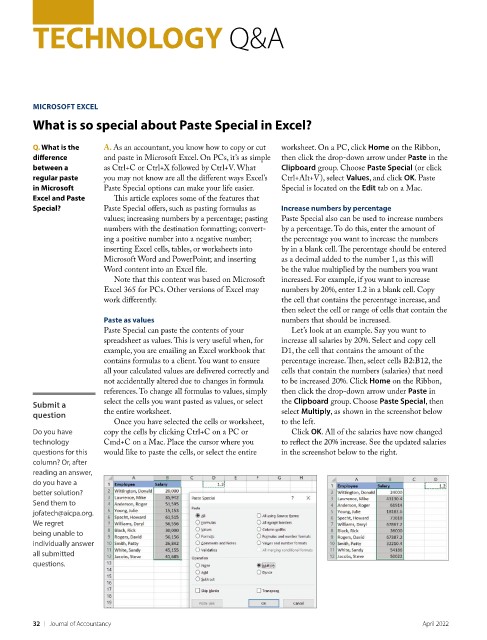
                          Paste Special can paste the contents of your   Let’s look at an example. Say you want to
                          spreadsheet as values. This is very useful when, for   increase all salaries by 20%. Select and copy cell
                          example, you are emailing an Excel workbook that   D1, the cell that contains the amount of the
                          contains formulas to a client. You want to ensure   percentage increase. Then, select cells B2:B12, the
                          all your calculated values are delivered correctly and   cells that contain the numbers (salaries) that need
                          not accidentally altered due to changes in formula   to be increased 20%. Click Home on the Ribbon,
                          references. To change all formulas to values, simply   then click the drop-down arrow under Paste in
         Submit a         select the cells you want pasted as values, or select   the Clipboard group. Choose Paste Special, then
         question         the entire worksheet.                     select Multiply, as shown in the screenshot below
                            Once you have selected the cells or worksheet,   to the left.
         Do you have      copy the cells by clicking Ctrl+C on a PC or   Click OK. All of the salaries have now changed
         technology       Cmd+C on a Mac. Place the cursor where you   to reflect the 20% increase. See the updated salaries
         questions for this   would like to paste the cells, or select the entire   in the screenshot below to the right.
         column? Or, after
         reading an answer,
         do you have a
         better solution?
         Send them to
         jofatech@aicpa.org.
         We regret
         being unable to
         individually answer
         all submitted
         questions.


         32    |   Journal of Accountancy                                                            April 2022

