


Page 399 - JoFA_2022
P. 399
TECHNOLOGY Q&A


         MICROSOFT EXCEL

         Efficient ways to open Microsoft Excel

         Q. When I open   A. Since these questions involve a similar theme,   In order to disable the Start screen, go to File,
         Excel, I always   I decided to include them both here. There are   Options, General. Under Start up options, un-
         have to choose   actually a couple of ways to have Excel open most   check Show the Start screen when this applica-
         Blank workbook.   conveniently for you. You can disable the Start   tion starts. Click OK. The Excel Options window
         Is there any way   screen and have either a blank workbook automati-  should look similar to the one in the screenshot at
         to have Excel do   cally open or specific files automatically open. You   the top of the next page.
         this automatically   can also have Excel open automatically.  Now, when you open Excel, a new, blank Excel
         and skip the step                                          workbook will automatically open without your
         of getting the   Disable Start screen and automatically open a   having to select that from the Start screen. If you
         Start screen?    blank Excel workbook                      decide you would like the Start screen to open
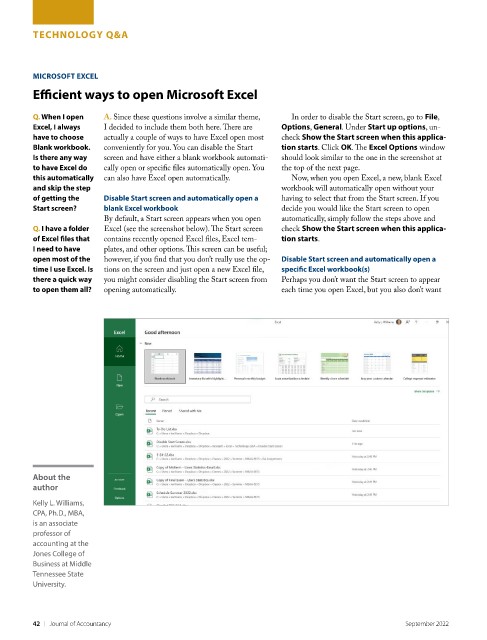
                          By default, a Start screen appears when you open   automatically, simply follow the steps above and
         Q. I have a folder   Excel (see the screenshot below). The Start screen   check Show the Start screen when this applica-
         of Excel files that   contains recently opened Excel files, Excel tem-  tion starts.
         I need to have   plates, and other options. This screen can be useful;
         open most of the   however, if you find that you don’t really use the op-  Disable Start screen and automatically open a
         time I use Excel. Is   tions on the screen and just open a new Excel file,   specific Excel workbook(s)
         there a quick way   you might consider disabling the Start screen from   Perhaps you don’t want the Start screen to appear
         to open them all?  opening automatically.                  each time you open Excel, but you also don’t want


         About the
         author

         Kelly L. Williams,
         CPA, Ph.D., MBA,
         is an associate
         professor of
         accounting at the
         Jones College of
         Business at Middle
         Tennessee State
         University.


         42    |   Journal of Accountancy                                                        September 2022

