


Page 398 - JoFA_2022
P. 398
MICROSOFT EXCEL

          Increase time increments by minutes in Excel

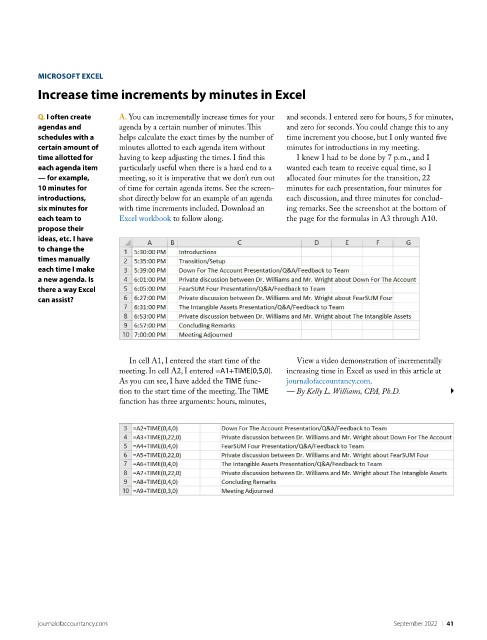
          Q. I often create   A. You can incrementally increase times for your   and seconds. I entered zero for hours, 5 for minutes,
          agendas and        agenda by a certain number of minutes. This   and zero for seconds. You could change this to any
          schedules with a   helps calculate the exact times by the number of   time increment you choose, but I only wanted five
          certain amount of   minutes allotted to each agenda item without   minutes for introductions in my meeting.
          time allotted for   having to keep adjusting the times. I find this   I knew I had to be done by 7 p.m., and I
          each agenda item   particularly useful when there is a hard end to a   wanted each team to receive equal time, so I
          — for example,     meeting, so it is imperative that we don’t run out   allocated four minutes for the transition, 22
          10 minutes for     of time for certain agenda items. See the screen-  minutes for each presentation, four minutes for
          introductions,     shot directly below for an example of an agenda   each discussion, and three minutes for conclud-
          six minutes for    with time increments included. Download an   ing remarks. See the screenshot at the bottom of
          each team to       Excel workbook to follow along.         the page for the formulas in A3 through A10.
          propose their
          ideas, etc. I have
          to change the
          times manually
          each time I make
          a new agenda. Is
          there a way Excel
          can assist?


                                In cell A1, I entered the start time of the   View a video demonstration of incrementally
                             meeting. In cell A2, I entered =A1+TIME(0,5,0).   increasing time in Excel as used in this article at
                             As you can see, I have added the TIME func-  journalofaccountancy.com.
                             tion to the start time of the meeting. The TIME   — By Kelly L. Williams, CPA, Ph.D.
                             function has three arguments: hours, minutes,


          journalofaccountancy.com                                                            September 2022    |   41

