


Page 187 - Divyank Tyagi
P. 187
|
                                                                         sTraTegies for managing TemplaTes    153


                             ◆ ◆ Line styles and patterns
                             ◆ ◆ Object style settings
                             ◆ ◆ Viewport types
                             To use this command, you must first have both the source and target Revit files open
                           within the same instance of the software. As an alternative, you can have the source file
                           linked into your target file. Next, make the target file the active project. Switch to the Manage
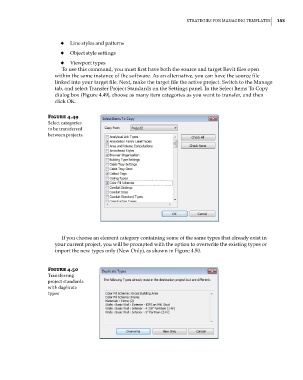
                           tab, and select Transfer Project Standards on the Settings panel. In the Select Items To Copy
                           dialog box (Figure 4.49), choose as many item categories as you want to transfer, and then
                           click OK.

                        Figure 4.49
                        select categories
                        to be transferred
                        between projects.


                             If you choose an element category containing some of the same types that already exist in
                           your current project, you will be prompted with the option to overwrite the existing types or
                           import the new types only (New Only), as shown in Figure 4.50.


                        Figure 4.50
                        Transferring
                        project standards
                        with duplicate
                        types


          c04.indd   153                                                                             5/3/2014   10:37:06 AM

