


Page 389 - Divyank Tyagi
P. 389
|
                                                                                        energy MoDeling    355


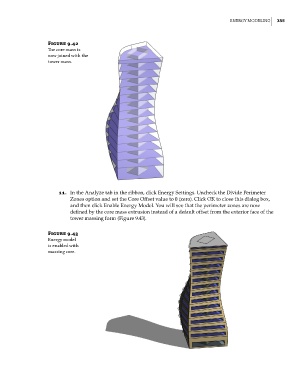
                        Figure 9.42
                        The core mass is
                        now joined with the
                        tower mass.


                            11.  In the Analyze tab in the ribbon, click Energy Settings. Uncheck the Divide Perimeter
                                Zones option and set the Core Offset value to 0 (zero). Click OK to close this dialog box,
                                and then click Enable Energy Model. You will see that the perimeter zones are now
                                defined by the core mass extrusion instead of a default offset from the exterior face of the
                                tower massing form (Figure 9.43).


                        Figure 9.43
                        energy model
                        is enabled with
                        massing core.


          c09.indd   355                                                                             5/3/2014   11:01:15 AM

